How do I change my default markup percentage in Quick Quote?
Last updated: April 1, 2026
You can set your own default markup percentage directly within Quick Quote. The initial system default is 10%, but you can update it to any value that suits your workflow.
Here's how to set your default markup:
Create a New Quote Request: Open a new quote request in Quick Quote — the markup will initially display at 10%.
Adjust the Markup: Change the markup percentage to your preferred value (e.g., 15%).
Save as Default: Click the lightbulb icon that appears after making your change to save it as your new default.
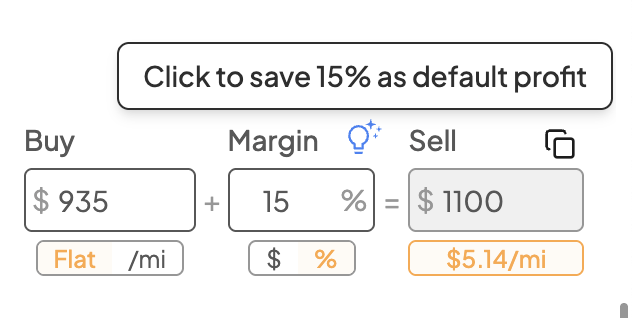
Here's what to know once your default is set:
All future quote requests will automatically use your saved default markup percentage.
You can still manually adjust the markup for individual quotes without affecting your default.
To update your default, simply change the markup to a new value and click the lightbulb icon again.