How the Quick Quote Agent drafts replies
Last updated: October 26, 2026
The Quick Quote Agent quotes truckload requests for you as they arrive. When a quote request lands in your inbox, it looks up the buy rate, applies your company's pricing, and writes a reply-all in the thread for you to review and send. It runs on the settings your team agreed with Drumkit, which you can see in the Drumkit Portal.
What the agent does with each request
Reads the request. Kit pulls the lane out of the email, the same way it does for Quick Quote. The agent needs pickup and dropoff (city and state, or ZIP) and the equipment.
Finds the buy rate. It prices the lane with your company's rate sources (DAT, Greenscreens, SONAR, Truckstop, etc.) and picks one the way your agent is set up: a specific source, the lowest, the highest, or the average of your market sources. Your agent can also adjust the DAT rate based on market conditions, such as the load-to-truck ratio.
Sets the sell rate. It adds your agent's markup or margin, then applies its rules: different pricing by equipment or distance, minimum and maximum margin, minimum and maximum quote, fuel and rounding.
Writes the reply. It drafts a reply-all in the same thread, using your team's quote template. In Outlook, the draft gets the Drumkit/Quick Quote category so it's easy to find, and the customer's email is marked unread again so you don't miss it.
Usually the agent drafts, so a rep reviews every quote before it goes out. Drumkit can also set an agent to send the reply itself. Ask your Drumkit admin which yours does.
Here's what you'll see
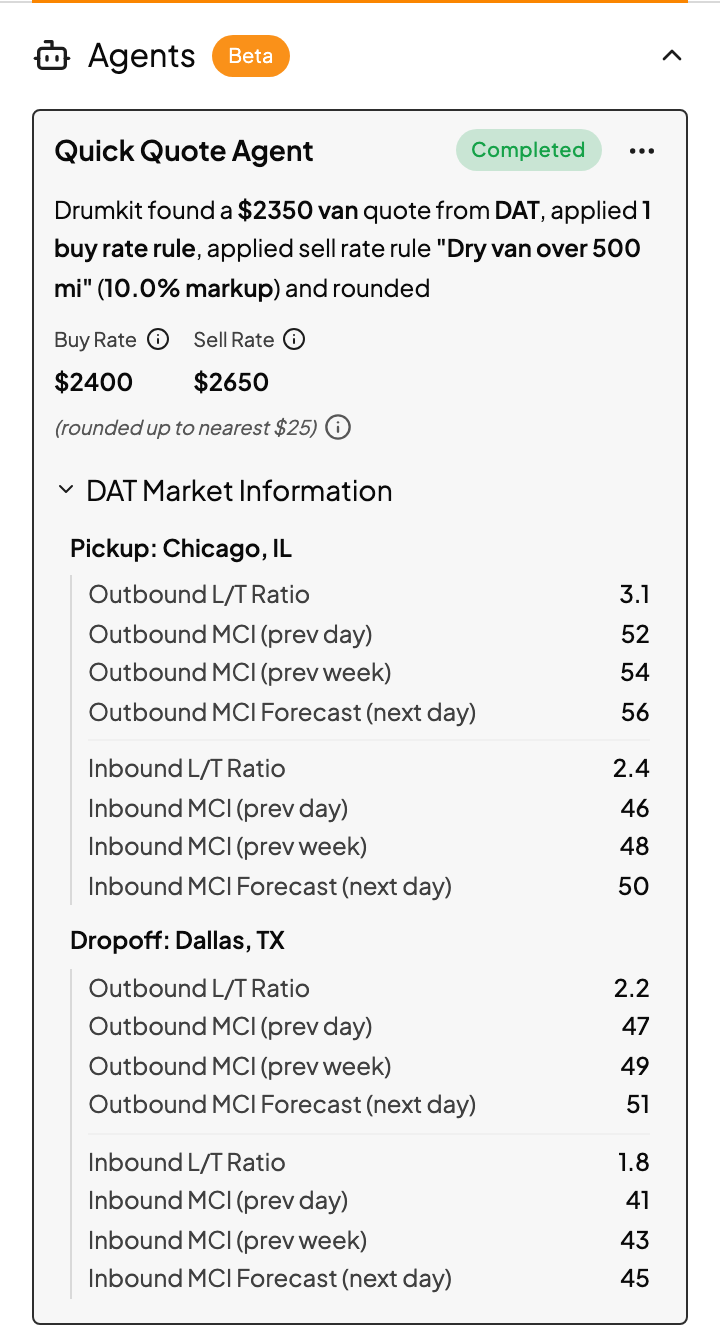
Open the customer's email and Drumkit. In Quick Quote, the Agents section (marked Beta) shows what the agent did on this thread:
Rate Estimate and Final Buy Rate: the rate it found, from which source, and any market adjustment.
Sell rate rule applied (or Default agent pricing) and Final Sell Rate: how it got to the price in your draft, including fuel and rounding.
DAT Market Information: the load-to-truck ratio and market conditions it looked at.
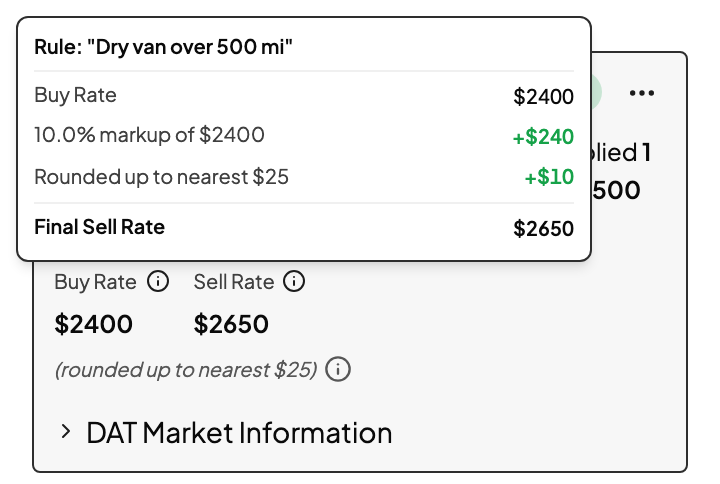
Then open your draft, check it, edit if you need to, and send.
Disagree with the agent's number? Quote the lane in Quick Quote below the Agents section, and replace the draft. Then tell your Drumkit admin, so the agent's rules can be adjusted.
Several lanes in one email
When an email asks for several lanes, the agent writes one reply that lists every lane. If it couldn't price one of them, that lane says Quote unavailable with the reason, so you can fill it in before you send.
What the agent doesn't do
LTL. It quotes truckload only.
Bidding portals. It never submits bids. On a portal, use Quick Quote or Submit Bid.
Front. It drafts in Outlook and Gmail.
Old email. It's built for requests as they arrive. For an older request, use Quick Quote.
Guess. If it can't find a usable rate, or the price would break one of your limits, it doesn't draft anything. Quick Quote shows Agent encountered an error. Quote below using Quick Quote.
Turn your agent off or on
In the Agents section, open the menu and click Disable Agent. It stops running on new emails until you click Enable Agent. From the same menu, View Agents and View History open the agent's settings and history in the Drumkit Portal.
FAQs
Why didn't the agent draft a reply to this email?
The usual reasons: the email wasn't read as a truckload quote request, it was missing pickup, dropoff or equipment, the sender isn't on your agent's list, no rate source returned a usable rate, or the price broke one of your limits. If the Agents section isn't there at all, the agent didn't run on this thread. Forward the email to support@drumkit.ai and we'll check.
The agent quoted one customer but ignores another.
Agents match senders by exact email address or exact domain. An agent set up for @customer.com won't match @mail.customer.com. Send us the sender address and we'll update the list.
My teammate and I both got the request. Do we both get a draft?
Yes. Each person the request reaches gets their own run of the agent assigned to them.
Where's the draft?
In your Drafts, in the same thread as the customer's email. In Outlook it has the Drumkit/Quick Quote category.
Does a draft count as quoting the customer?
Not on its own. Once you send the reply, Kit detects it and moves the lane to Replied to. See See what's been handled.
Related