Use account notes when you quote
Last updated: November 18, 2026
Account notes are short instructions for a specific customer, such as who the quote goes to, what not to quote, or an extra charge to add. If your team has them set up, Quick Quote shows the notes for that customer right where you set the rate, so you don't have to remember every account's quirks or dig through an old email.
Where you see them
Click Get Quick Quote. If the request's customer has notes, they show at the top of Rate Breakdown, above the calculator, under a header like Global Logistics Inc. · 3 account notes. Click the header to fold them away.
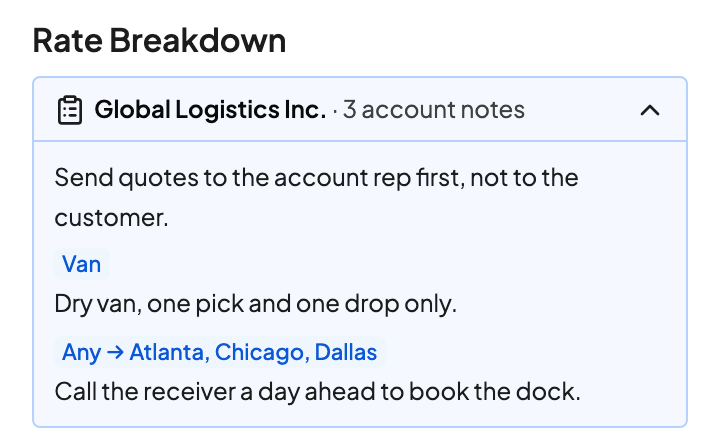
Notes for the whole account show on every quote for that customer.
Notes for one equipment type or lane carry a tag, such as Van, Box Truck, or Any → Atlanta, Chicago, Dallas. They only show when the quote matches. Change the transport type or the lane and the list updates.
The floating sell rate bar also shows a 3 account notes pill. Click it to scroll back to the notes. In Batch Quote, each lane shows the notes that match it above its calculator, even when the lane is collapsed.
Notes never change a price. If a note says to add a charge or use a different markup, you make that change in Rate Breakdown yourself.
When notes don't show
Notes are tied to the customer on the quote. If the Customer field is empty or shows the wrong account, you won't see that account's notes. Pick the right customer and the notes update. If a customer has no notes for this equipment and lane, there's simply no notes box.
Adding or changing notes
Drumkit support sets up account notes for each rep, so they read the same way for everyone who quotes that account. Send the customer, the note, and anything it only applies to (an equipment type, a pickup or delivery area) to support@drumkit.ai. Each note can be up to 500 characters; shorter is easier to scan.
FAQs
Can my teammates see my notes?
Notes are set up per rep. If several reps quote the same account, ask support to add the notes for each of them.
Can a note send my reply to someone other than the customer?
A note only reminds you. If your team wants replies for an account to go to a specific person every time, ask support about an account-specific reply template, which fills in who the reply goes to and who's copied.
Do notes show on the Quick Quote Agent's replies?
No. They're for reps quoting in the sidebar, in Quick Quote and Batch Quote.
Related