Find quote requests with the DK Quote label
Last updated: November 18, 2026
If your team has it set up, Drumkit tags the quote requests you're meant to work with an orange DK Quote category in Outlook. It's for reps who cover some accounts but not others: the requests that are yours stand out in a busy inbox, and you can pull them all up in one click.
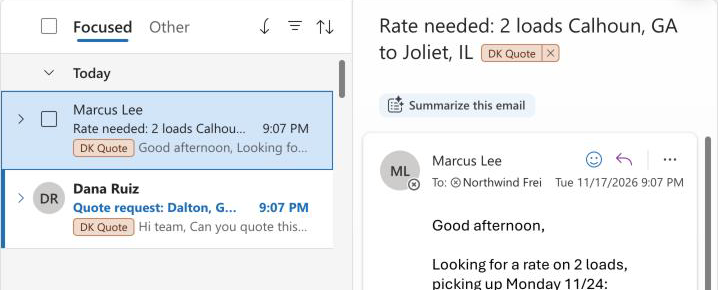
Which emails get it
Your team picks what counts, and Drumkit support sets it up for you. A rule can match on:
The customer the request is from, or specific senders or email domains.
Equipment, to include or leave out a transport type such as flatbed.
Pickup or delivery cities, to include or leave out lanes. For example, "everything from this customer except loads delivering to one city."
When Kit reads a new email and finds a quote request that matches, it adds DK Quote. In a batch email, one matching lane is enough. Emails that aren't quote requests, or don't match, are left alone.
What the label does and doesn't do
It shows up within about a minute of the email arriving, once Kit has read it.
It keeps any categories you already use. Drumkit adds DK Quote next to them and never removes yours.
It doesn't move, flag or mark the email as read, and it doesn't count as quoting. A request still shows as Quoted only when you send, draft or copy your reply.
See all your DK Quote emails
In Outlook on the web and the new Outlook, open Categorize → Manage categories and star DK Quote. Starring adds the category to your folder pane, so one click shows every tagged email.
Remove the label from an email the same way you'd remove any category: right-click it, Categorize, and click DK Quote. Drumkit won't add it back to that email.
FAQs
Do older emails in my inbox get the label?
No. Drumkit labels new emails as they arrive, starting from when your rules are set up. It doesn't go back through your inbox.
A request I should have gotten has no label. Why?
Usually one of three things: Kit didn't read it as a quote request, it couldn't match the customer (for example a new contact at the account), or it's from a lane or equipment type your rules leave out. Send the subject line and when it arrived to support@drumkit.ai and we'll check it.
Does it work in Gmail or Front?
Not today. The DK Quote label is Outlook only.
I deleted the DK Quote category. Will it come back?
Yes. Outlook recreates it the next time Drumkit labels an email, though it may show up gray for up to an hour. You can recolor it to orange in Manage categories.
Can I change which emails get it?
Email support@drumkit.ai with what to add or leave out (a customer, a sender, a lane, or an equipment type) and we'll update your rules.
Related